Introduction
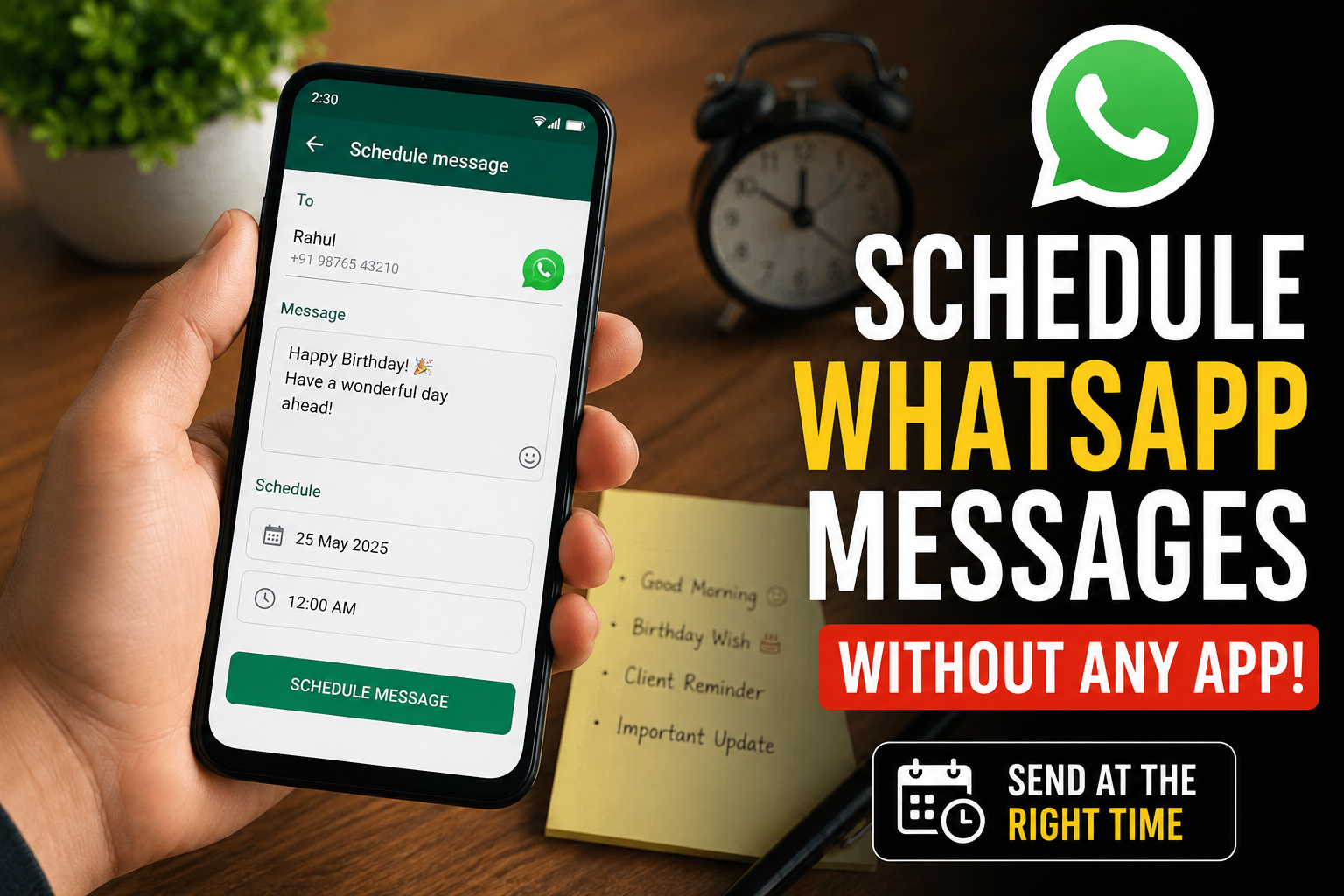
Have you ever wanted to send someone a WhatsApp message at a specific time, but were afraid you might forget? Maybe you wanted to wish someone a happy birthday at midnight, or send a “good morning” message to a friend early in the morning, or remind a client of an important event during office hours.
Most people think that scheduling messages on WhatsApp requires a separate app. But the truth is, that’s not always the case. In this complete guide, I’ll show you easy ways to schedule WhatsApp messages, including one that doesn’t require you to install any additional third-party apps. Everything explained here is easy to understand, even if you’re not very tech-savvy.
Why is there a need to schedule WhatsApp messages?
Before we get to the methods, let’s take a look at why scheduling messages is so useful.
There are many situations in our daily lives where this feature comes in handy. For example, you want to wish someone a happy birthday at midnight, but don’t want to stay up late. Or you want to send a reminder to a colleague or client at the start of their day. Sometimes something comes to your mind at night, but you don’t want to disturb anyone before morning.
And if you run a small business, scheduling can help you reach your customers at the right time, without having to be glued to your phone all the time.
Whatever the reason, scheduling takes the pressure off of remembering. You set it once, and the message goes out on time.
Can messages be scheduled within WhatsApp itself?
There’s one important thing to understand here. Currently, the regular WhatsApp app doesn’t have a built-in “schedule message” button for private chats, like email apps do. This is a common misconception that many people have.
But despite this, there are some real and reliable ways to get the job done. Some of them are already on your phone, and some use WhatsApp’s own business tools. Let me walk you through the best options one by one.
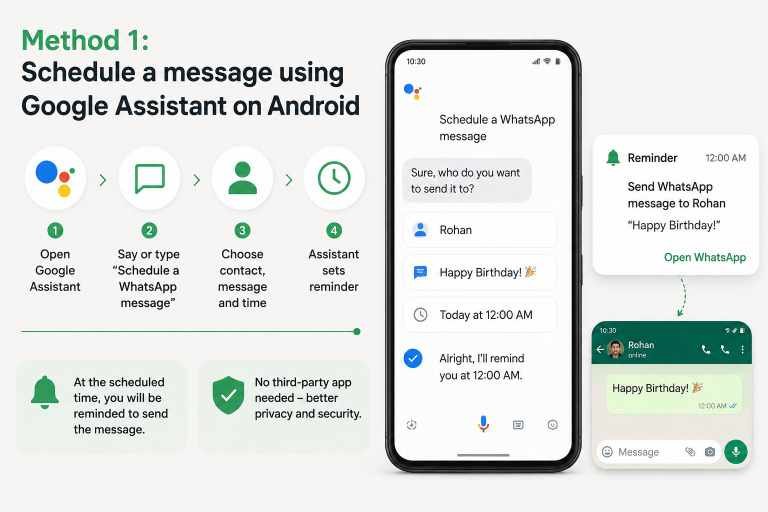
Method 1: Schedule a message using Google Assistant on Android
If you’re using an Android phone, you can take advantage of Google Assistant. The biggest advantage of this is that it’s already on most Android phones, so you don’t need to download a new messaging app.
First, make sure you have Google Assistant set up and turned on your phone. Then you can speak or type a command, like “Schedule a WhatsApp message.” The Assistant will then ask you who you want to message, what to write in the message, and when to send it.
Once you’ve confirmed all the details, Google Assistant sets a reminder. It prepares the message at the appointed time and prompts you to send it with a tap. Although it is not 100% automatic in every case, it saves you the trouble of remembering and typing everything anew.
This method is also useful because it does not require any unrelated app to access your messages, which is better for your privacy.
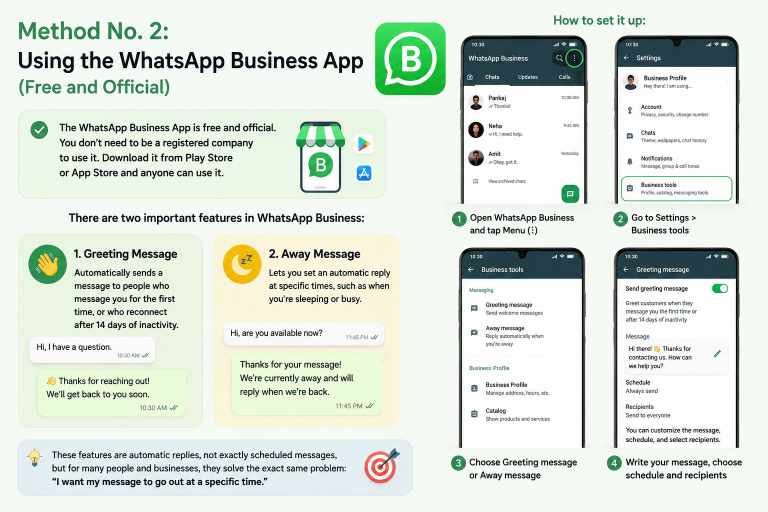
Method No. 2: Using the WhatsApp Business App (Free and Official)
This is my favorite method, because it is completely official and made by WhatsApp itself. The WhatsApp Business App is completely free, and you do not need to be a registered company to use it. Anyone can download it from the Play Store or the App Store.
There are two features within WhatsApp Business that are important to know about.
The first feature is called Greeting Message. It automatically sends a message to people who message you for the first time, or who reconnect after a 14-day period of inactivity.
The second feature is Away Message. This lets you set an automatic reply at specific times, such as when you’re sleeping or busy.
To set up both of these, open WhatsApp Business and go to Settings, then Business Tools. From there, you can choose between Greeting Message or Away Message. You can write your own text, choose a schedule, and even decide who receives the message.
Technically, these features are automatic replies rather than scheduled messages, but for many people, especially small businesses, they solve the exact same problem: “I want my message to go out at a specific time.”
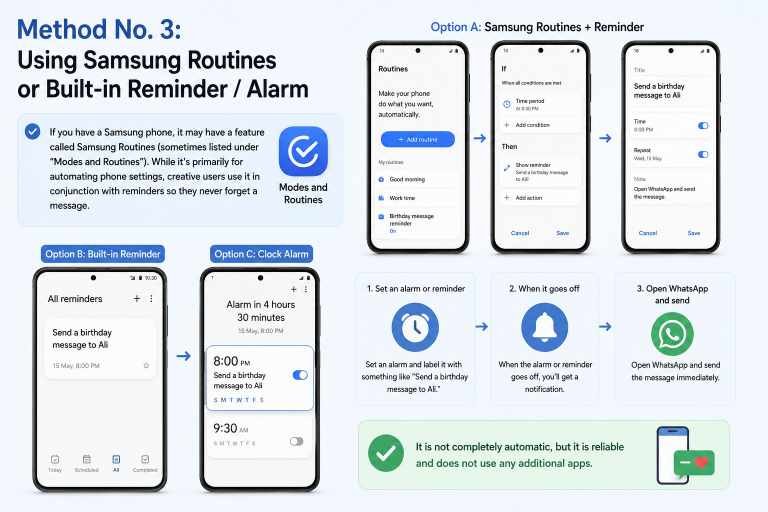
Method 3: Use your phone’s built-in scheduling feature (for Samsung users)
If you have a Samsung phone, it may have a feature called Samsung Routines (sometimes listed under “Modes and Routines”). While it’s primarily for automating phone settings, creative users use it in conjunction with reminders so they never forget a message.
You can also use the built-in Reminder or Clock Alarm feature. Set an alarm and label it with something like “Send a birthday message to Ali.” When the alarm goes off, you can the app will open and send the message immediately. It is not completely automatic, but it is reliable and does not use any additional apps.
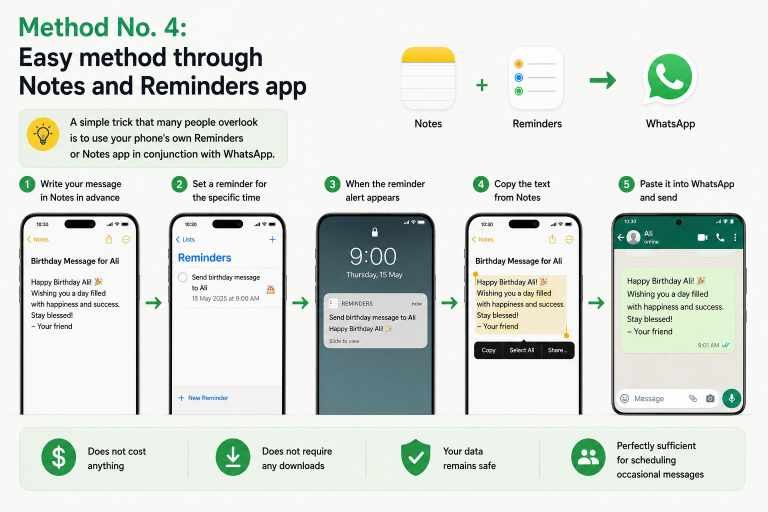
Method No. 4: Easy method through Notes and Reminders app
A simple trick that many people overlook is to use your phone’s own Reminders or Notes app in conjunction with WhatsApp.
The method is very simple. Write your message in advance in Notes, then set a reminder for that specific moment. When the alert appears, you just copy that text and paste it into WhatsApp.
This method does not cost anything, does not require any downloads, and your data remains safe because it does not involve any third party. This method is perfectly sufficient for scheduling occasional messages.
A special tip for iPhone users
If you use an iPhone, you can create an automation through Apple’s Shortcuts app. The Shortcuts app is Apple’s own official app and comes pre-installed on most new iPhones.
In it, you can create a new “Automation”, choose a time, and add a “Send Message” action to WhatsApp. At the specified time, your phone will prompt you to send a message. Since it is Apple’s own tool, it is considered safe for your account.
A word about third-party apps
On the Play Store, you will find many apps that claim to completely automate WhatsApp scheduling. Some really work, but there are some real risks in using them that should not be ignored.
These apps often ask for access to your messages and contacts, which can be a concern in terms of privacy. WhatsApp’s own rules discourage automation that goes against its terms, and sometimes accounts have even been temporarily blocked for using unofficial tools. That’s why the official methods mentioned above are the safer choice for most people.
If you value your privacy and account security, it’s best to stick with WhatsApp Business or your phone’s built-in tools.
Some useful tips to improve message scheduling
First, make sure your phone is connected to the internet at the scheduled time, as WhatsApp requires a connection to send messages. Be sure to check the contact’s name before confirming, so that your message reaches the right person. Write your message clearly in advance to avoid last-minute mistakes. And try the feature on your own number once before trusting it with something important.
These small precautions can save you from embarrassment, especially when the message is going to a client or someone important.
Frequently Asked Questions
Can I schedule WhatsApp messages for free?
Yes. Using WhatsApp Business or your phone’s built-in reminder tools is completely free.
Does WhatsApp officially allow message scheduling?
The regular app doesn’t have a personal scheduling button yet, but WhatsApp Business offers greetings and goodbye messages that work on a schedule.
Is it safe to use third-party scheduling apps?
This can be risky. These apps can access your personal data, and some may even be against WhatsApp’s terms of service. The official methods are more secure.
Will the recipient know that my message was scheduled?
No. The message looks just like a regular message, just like any other message.
Do these methods work on both iPhone and Android?
Most methods work on both. Google Assistant and Samsung Routines are for Android, while Shortcuts is for iPhone. WhatsApp Business is available on both platforms.
Final Words
Scheduling WhatsApp messages isn’t complicated, and you don’t always need a separate app to do it. Whether you use Google Assistant, the free WhatsApp Business app, or your phone’s built-in reminders, there’s a way to do it that suits your needs.
My honest advice is that if you want an official and reliable method, start with WhatsApp Business. For the occasional half-message, a simple reminder on your phone is enough. Try one of these methods today, and you’ll never forget to send an important message on time again.
If you found this guide helpful, be sure to share it with a friend who always forgets to reply on time. They’ll thank you for it.