

Introduction
WhatsApp is being used in most of the mobiles in the world and WhatsApp has come up with so many features from the beginning till now which make WhatsApp a perfect conversation application. After updating it every day, WhatsApp is making its app more enhanced and user-friendly which is becoming more helpful for WhatsApp users. In this article, I am going to talk about some of the updates of WhatsApp coming in 2025 which many of you may not know about. This feature is going to be one of the best features of WhatsApp and it is going to solve 70 percent of the problems of your WhatsApp which you used to face in WhatsApp earlier.
Whenever there is an update in WhatsApp, some new feature is definitely coming with it and that feature is such that WhatsApp is considering the demand of the users. It is added to the list, like some time ago, the feature of channels was introduced in WhatsApp in the status action. In this feature, you could create channels on your WhatsApp and through these channels, you could benefit people by sharing knowledgeable content with your channel community in WhatsApp and at the same time create a community of your own.
Chat Theme
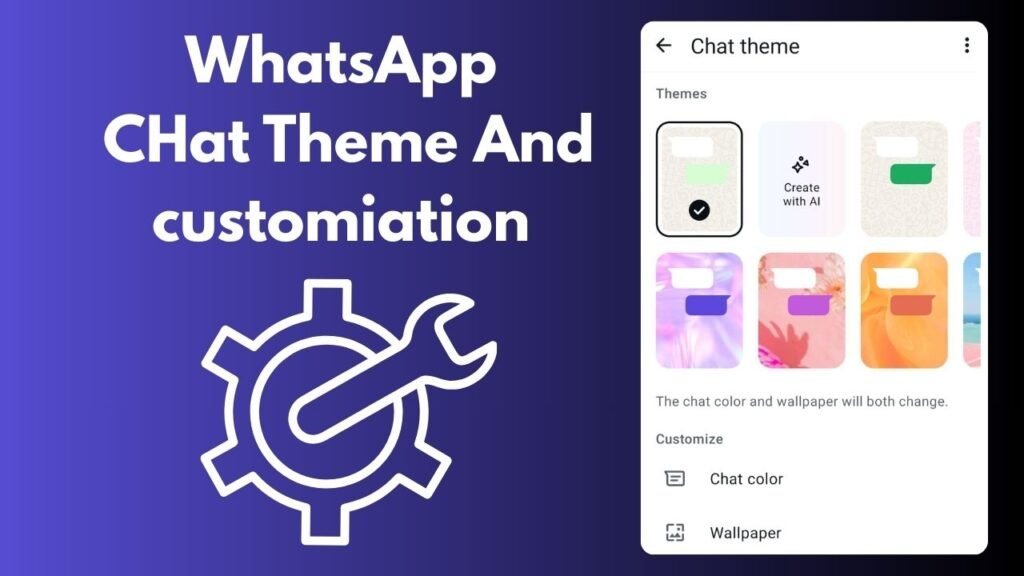
Earlier, if you had to set a WhatsApp theme in the WhatsApp chat section, there were only a few limited themes that you could set by going to the WhatsApp chat section, which had seven to eight themes and only you could set them. But now, after the arrival of Meta AI, there is a new feature in WhatsApp where after going to the WhatsApp chat theme option, you can now select the WhatsApp custom theme. Apart from this, you can create your own custom theme with Meta AI by adding your own custom theme and you can change the coloring, styling and every type of styling of the chat. This is a very good feature in WhatsApp to make a chat unique, after which you can customize the chat and enhance its styling even more.
Group Talk Feature
For example, WhatsApp keeps adding some new feature in its updates for the groups that are created in WhatsApp. In this update, a new feature has been added to WhatsApp. If you open any WhatsApp group and slide to the end of its chat, a mini call section will open there where people can connect with you and talk without calling. Whoever accepts this call can talk to you. Through this feature, you can create a call just like a voice message where whoever accepts from the group members can talk to you. Now, by the way, there is a call for this too, but in the call, all the group members used to get full color, but by using this feature, when you click on the talk option, the person who opens the group will get a notification and he can connect from there and talk to you.
Call Features for WhatsApp Group
The first two features that were available in the group call section were voice call and video call options, where now only voice and video calls could be made to group members, but after the update, many more features have been updated.
Select Peoples Feature
The first of which is the feature of select people. Now before calling on WhatsApp, you can select some people from the group whom you want to add to the call. For example, there are 10 people in a group and you want to call only five of them. In the WhatsApp group, you can select them personally from this feature of WhatsApp. When you call, only those five people will be called. The rest of the people will not be notified of the call. This is one of the best features of WhatsApp, through which you can select custom people from the group members and talk to them on the call.
Schedule WhatsApp Call
The second feature, which is added What has been added in the call section of WhatsApp is the scheduled call. In this, you can set the time of a call at which the WhatsApp group members will be automatically called. Through this feature, if you want to call a group at a specific time, you can schedule the call, after which as soon as the time comes, you will also get a call notification and the rest of the group members will also be called. This is also one of the best features of WhatsApp for making group calls.
Send WhatsApp Custom Call Link
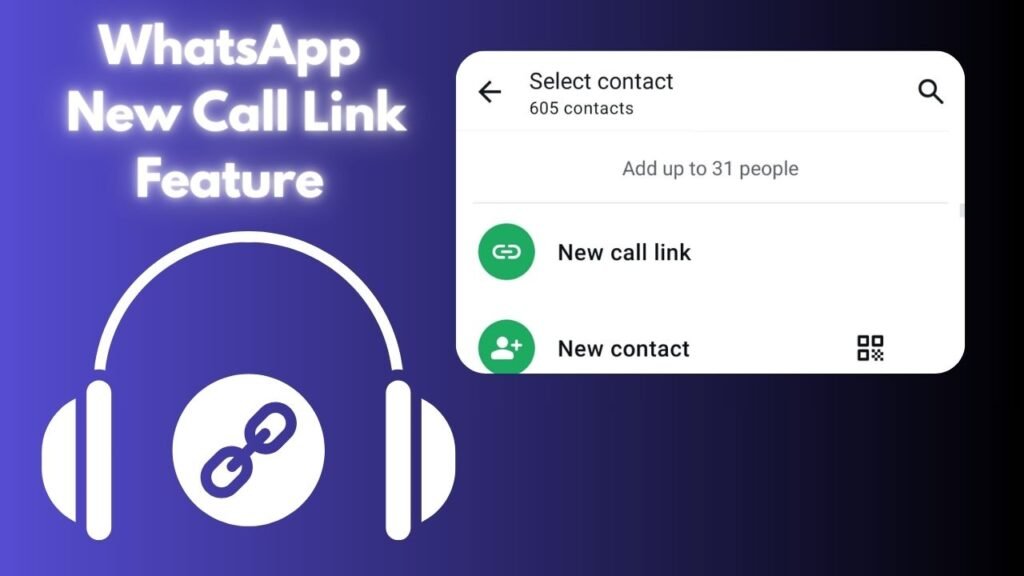
Now the third feature that has been added to the WhatsApp group call section is the send link. Now through this feature, you can create your own custom link, which you will send to any group. In this, both video call and voice call options are available. You can create a link for whoever you want to call and send it to the group. If you send that link to any of your other members, that group member will also send that link to those members, and those members will also join your call. It can be and this is also one of the best features of WhatsApp for groups.
WhatsApp Status Advertising Feature
WhatsApp has given all the features after the update, but this feature of WhatsApp’s status advertising is going to be a separate and best feature from all these features. Now after this feature, many businessmen, small enterprises and people who are running small businesses are going to be very beneficial because now you can run your ads in the status section of WhatsApp, just like you used to make WhatsApp statuses. Similarly, now you can run any of your products or any of your videos as an ad in the status section of your WhatsApp, which will reach people. It is like other social media platforms, just like you used to run meta-ads on Facebook, ads on YouTube, etc., in the same way, now you can run custom ads in WhatsApp. I have written an article in detail about it, which you can read and know more about it and how you have to run ads. Details are written in this article.

Also Read
New Ads Feature In WhatsApp Status 2025 Full detailed review
WhatsApp Call schedule
Now the WhatsApp call scheduling feature that I mentioned above was a scheduling feature for group members, but now you can schedule WhatsApp calls for any normal person or for any of your contacts. For this, you have to go to the call section of WhatsApp. There, you will get the scheduling option; by clicking on it and selecting it, all your contacts will be shown in front of you, from which you can show the contact whose call you want to schedule. Apart from this, you will get the Add to Calendar feature, after selecting which, the date will be set in your calendar. On the date and time, you want to call, you will have a call from both WhatsApp and Calendar. This is one of the best features for call reminders.
WhatsApp Dialer Feature
In WhatsApp, where earlier if you had to call any number, you had to first save the WhatsApp number of that person, otherwise you had to send this number to another number of yours and select it from there and enable the chat feature, but now in the call section of WhatsApp, you will get a dial option, by clicking on which you can type the number you want to call and from there you can directly dial the WhatsApp call to any custom number. This feature of WhatsApp is very useful; by using it, you do not need to save the number of any person or send this number to any other place. Now you can directly dial this number from the WhatsApp dialer and receive a WhatsApp call.
Status Privacy and sharing
Now another new feature related to status has been added to WhatsApp, Status Privacy. Now, by using this feature, you can further enhance the privacy of your status. In this feature, you get the option of sharing status. If you want only people to see your WhatsApp status and not to forward or share it to anyone else, then whoever sees your WhatsApp status can neither forward nor share it to anyone else. Apart from this, you can now upload your WhatsApp status to Facebook and Instagram stories simultaneously. Here, you have to link your Facebook and Instagram accounts with WhatsApp and whatever status you post will automatically be posted on Facebook and Instagram stories as well.
WhatsApp Web On Mobile
A new feature has also been added related to WhatsApp Web, such as earlier you could only use WhatsApp Web on your laptop or computer, but now you can also use WhatsApp Web on your mobile. For this, you simply have to open your Chrome browser in the desktop site and open the WhatsApp Web site. Then you will go through the same process that you used to do with your computer. You can open WhatsApp on your mobile as a linked device by doing that process.
Final Words
These were some of the new features after the WhatsApp update, which are making WhatsApp even more enjoyable and many people are getting benefits by using these features. If this feature of WhatsApp is not available in your mobile, then update your WhatsApp once from the Play Store. You also have this WhatsApp feature. But if you have not received the update yet, then wait a little because these WhatsApp updates are slowly coming to all devices. Out of all these updates, which WhatsApp update did you like the best, you must tell in the comments and in your opinion, which update in WhatsApp should be introduced that WhatsApp has not yet received.
People Also Ask
WhatsApp New features in latest version 2025?
Many features have been added in the new update of WhatsApp, such as the status advertisement feature has been added to WhatsApp, the feature of Schedule for WhatsApp calls has been added, the feature of WhatsApp link sharing has been added, and many other features have been added, which I have shared in full detail above in this article.
What Is New WhatsApp status features ?
Many features were also added to the Status section of WhatsApp, in which WhatsApp’s privacy has been enhanced. In addition, a new feature of WhatsApp’s status advertising has been added, and features of WhatsApp’s layout and design have been added.
How to use WhatsApp new features?
If all the features of WhatsApp mentioned above are not available on your WhatsApp, then to use them, first update your WhatsApp from the Play Store, after which all these features will be automatically added to your WhatsApp.