
Introduction
Nowadays, many people are facing this issue in their mobile that there are a lot of unwanted ads in their mobile and neither they know where these ads are coming from due to which they have to face a lot of problems.
Whenever they are using any application in their mobile, ads appear in front of it. After skipping one ad, another ad appears and in the same way, ads keep appearing in their mobile every time due to which people find it very difficult to use their mobile and a lot of viruses appear in their mobile.
In today’s article, we will tell you in full detail that if any kind of ads are appearing in your mobile, how can you remove them, whether it is notification ads or video ads that appear on the screen of your mobile and what could be the reason for the appearance of these ads, I am going to tell you in full detail in this article.
Reasons why these Ads appears In Your Mobile
First of all, let’s see how these ads come and why such ads come to our mobile phones and each ad can have a different reason for its appearance.
1st Notification Ads
First of all, if your mobile is getting notification ads, meaning that you are repeatedly getting some notifications on your mobile that you are not aware of, then these are ads. Notification ads are ads that come because of different sites whose cookies you have Allowed. Now, there are some sites that contain viruses and when you visit those sites, you accept their cookies. Now, after accepting their cookies, even if you do not use those sites or you do not use your Chrome browser or any browser, those ads will keep coming in your notifications. Those sites will keep showing you ads through notifications. This is the first reason for notification ads.
2nd Video Ad
The second reason why video ads come is because of the application, now some applications come in our mobile which contain viruses and due to this virus, even if we do not use these applications, video ads keep coming in our mobile and sometimes it happens that we install some such application in our mobile which is not available on the Play Store and when we install their pirated version in our mobile, due to this, those applications create viruses in our mobile. Due to this virus, ads start appearing repeatedly in our mobile. Now how can these two types of ads can be removed and how can such a situation be avoided? In the next section, I am going to tell you.
First Most Important Setting of mobile
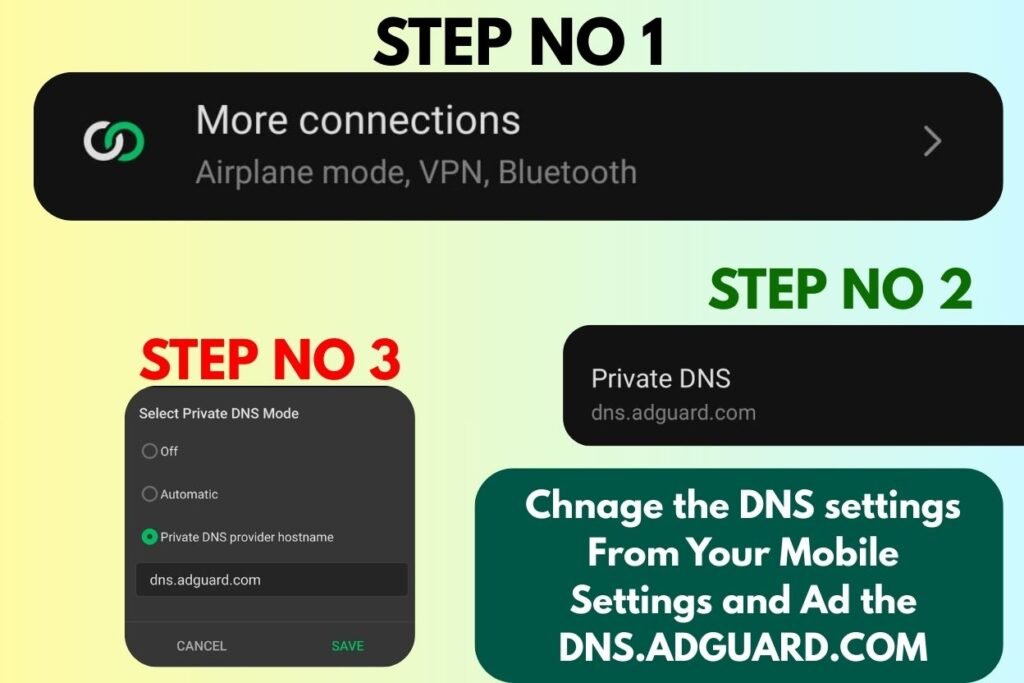
The first thing you need to do to block any kind of ads is to activate your private DNS in your mobile, due to which the number of ads coming to your mobile will be reduced.
- For this, open the settings of your mobile.
- Click on the option of More Connections.
- You will get the option of Private DNS, click on it.
- There click on the option of Private DNS Host Provider.
- There type this DNS.adguard.com.
- Then save it, the first step of your mobile has been completed.
How to Stop Unwanted Notification Ads
If you are only getting notifications ads on your mobile, let’s see how to remove them? For this, you have to open the Chrome browser from which you are getting ads, for example, most of the ads come from the Chrome browser. There, you have to click on the three dots at the top and click on the settings option. There, in front of the Site settings, all the sites whose cookies you have enabled, which you have visited, will be listed. Now, the name of the site from which you are getting ads will be written. If it is not written in the notification ads, then you have to remove all the sites that you are not visiting right now. Your notification ads will automatically be turned off.
How to Stop Unwanted Video Ads
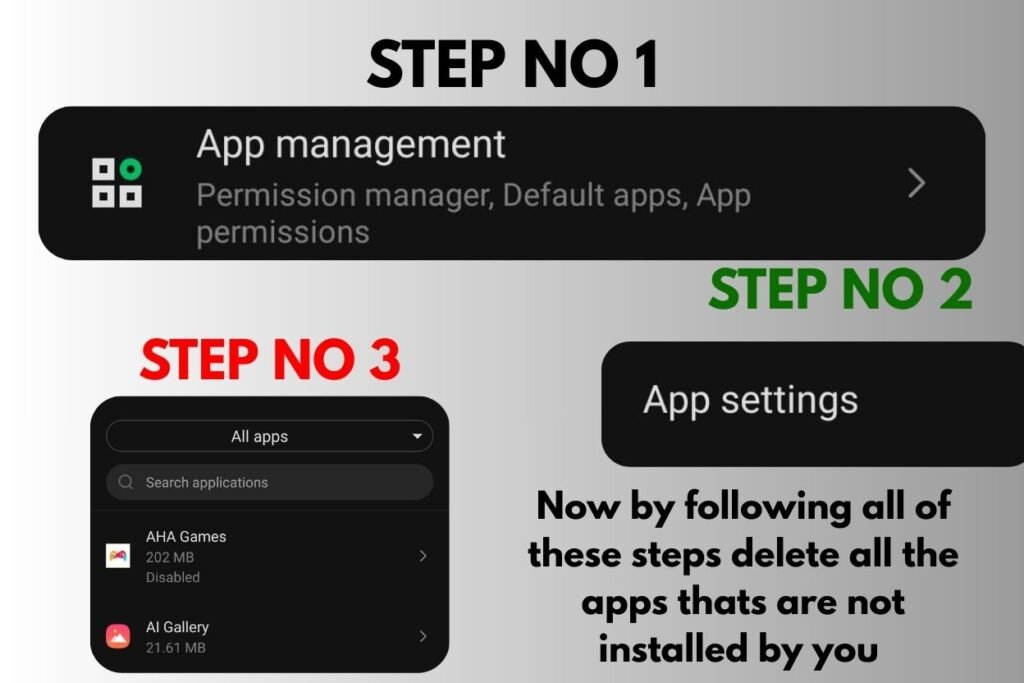
Now if video ads are appearing in your mobile, whenever you start using any app, an ad appears in front of your mobile, Let’s see how to remove it? Now, as I said, these ads are appearing due to some applications, which you have installed from Chrome, these are pirated app that are not available on the Play Store, due to which ads are appearing. Now sometimes it happens that these are applications that are not even showing on your home screen and are running in the background of your mobile and showing ads. To remove these apps.
- First of all, you have to open the settings of your mobile.
- There you will get the option of app management, click on it and click on the option of all apps.
- Now sometimes it happens that these applications have some very strange names, if you see any such application, then you have to uninstall it quickly from your settings.
- Then these are some applications that are neither named There is no icon for them, due to which the user does not know that this application is in my mobile, so for this you will find an empty space there, wherever you find empty space, in between all these applications, you have to click on this empty space, there you will get the uninstall option, so uninstall this application.
You all unwanted video ads problem that’s comes in your mobile will be solved.
What if these 3 settings not work
Now, if even after doing these three settings, ads are still coming to your mobile, then people also use the Ads Guard application from the Play Store to remove these ads. You can find many such applications on the Play Store that protect your mobile from ads, which you can keep in your mobile. After activating them, all the ads that are coming to your mobile are stopped, but mostly after doing these three settings, all the unwanted ads that come to your mobile are eliminated.
Final Words
Now, there can be only three reasons for the presence of ads in every mobile phone. In today’s article, I have told you how to disable all three types of ads. If any ads are present in your mobile phone, how can they be removed? What is the reason for the presence of these ads? I have also told you how to use an ad guard, which you can use to remove many unwanted ads from your mobile phone by setting the settings of your mobile phone.
Peoples also ask
- How do I stop ads on my phone permanently?
If your mobile is getting unwanted ads and you want to permanently remove them from phone, then the three methods I have given you are first to set up Ad Guard, then turn off the site notifications on your mobile, and thirdly, remove all unwanted apps that you have installed on your mobile from Chrome etc. After doing these three processes, you can stop the unwanted ads on your mobile.
- Why am I getting ads on my phone all of a sudden?
If suddenly ads have started appearing on your mobile which were not appearing before, then the main reason for this could be that either you have visited a site that had a virus and you have allowed its cookies, after which ads started appearing on your mobile, or you have not installed any app from Chrome that is now available on the play store, then due to this also, ads start appearing on your mobile. This means that a virus has entered your mobile.
- How to find out which app is popping up ads?
If you want to find out which app is causing the popping ads to appear on your mobile, then the simple reason is that as soon as the ad appears, you have to click on the Recently Used Apps button on your mobile, from where all the recent apps that you were using on your mobile are shown. There, you will basically be shown the app from which this ad has appeared, which you can easily remove by going to the settings.
- How to check if your phone has a virus in settings?
If your mobile has a virus, then two signs will appear in front of you. First, your mobile will start to slow down or hang. Second, your mobile will start to showing unwanted Ads. If both these signs are appearing in your mobile, then for some reason a virus has entered your mobile.
- How do I block ads on my Android phone?
Now such unwanted ads mostly come in Android phones and these are the three ways to remove ads in Android phones that I have told you in the above articles. By using these three, you can remove any kind of ads coming in your mobile.